

In-house product Office & coding modes Built on LingHarness

LingWorkOffice agent

Not a chatbot. A digital employee that gets work done.

Give it a task in one sentence. The agent plans, calls tools, reads and writes files, runs commands, and delivers the finished work to the results panel. It runs in a local sandbox with a full audit trail, and your data stays on your machine.

01 — Two modes

One workspace, two ways to work

Choose a mode for the task. The expert behavior, tools, and security policy switch with it, taking effect on the next turn.

Office work

Documents · Spreadsheets · Decks · Research

MODE 01

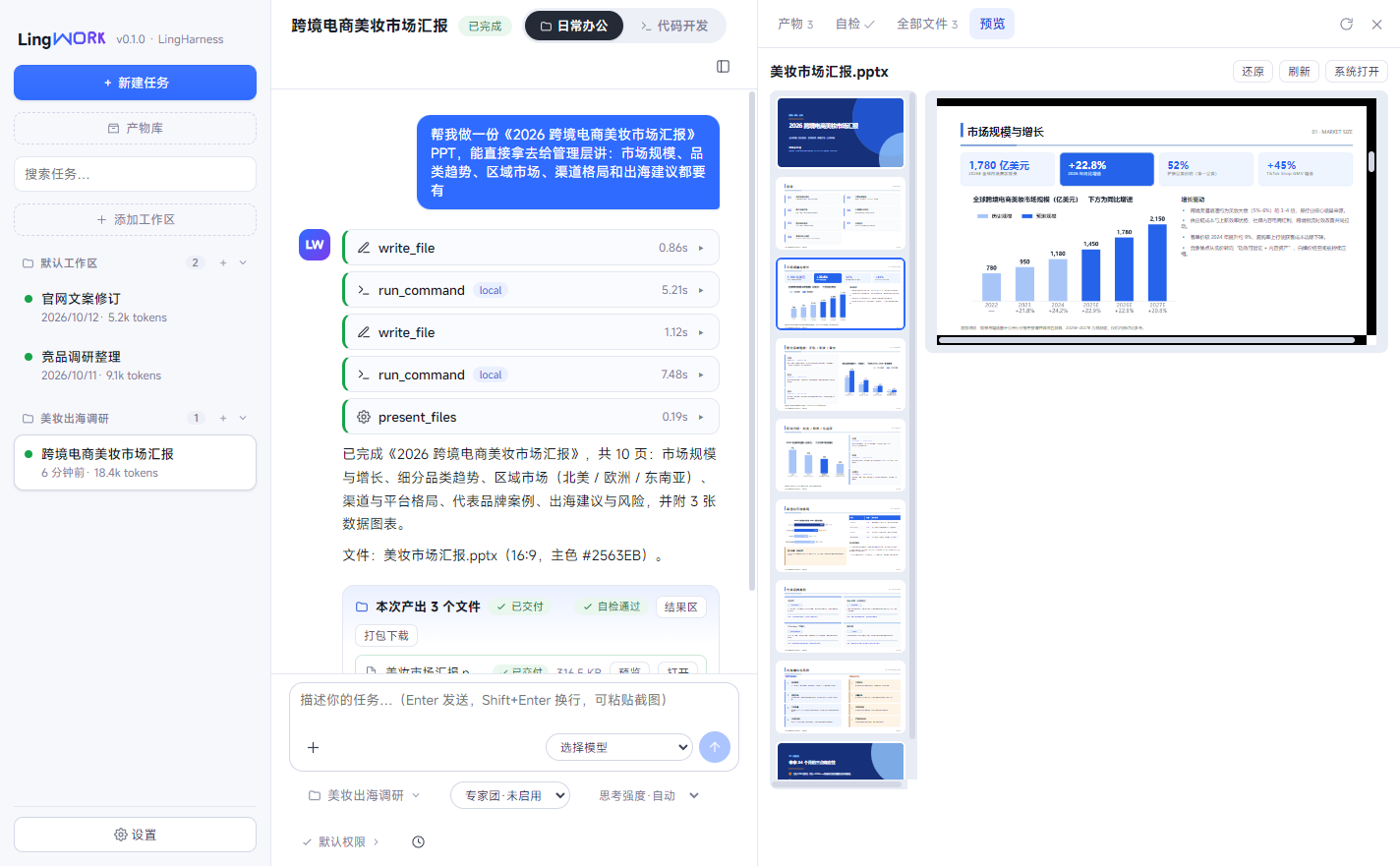
An office expert for non-technical work: documents, spreadsheets, presentations, and research. It produces Office files you can use directly — not text you have to paste somewhere else.

  • Generate proposals, reports, and presentation decks from a sentence, with automatic checks before delivery.
  • Excel cleanup, reconciliation, multi-sheet merges, and charts.
  • Rich previews for Word, Excel, PPT, and PDF — see changes immediately and edit in place.
  • Research and organization, with long documents summarized and filed automatically.
Turn last quarter’s sales data into an analysis report, then build the presentation. Screen these 30 résumés against the role and produce a comparison table.
Software work

Code · Debug · Scripts · Tests

MODE 02

A development expert for engineering work: read and write code, run commands, and execute tests in a sandbox. Every change gets a snapshot and a diff that is easy to review.

  • From requirement to code: write, debug, and test in one flow.
  • Workspace file access and command execution, all inside a secure sandbox.
  • Automatic snapshots before changes, with a clear unified diff.
  • SKILL.md skills and MCP tools connect to your existing systems.
Add an export feature to the admin panel, then run the tests. This repository’s dependencies are out of date. Upgrade them and fix the breakage.

02 — Delivery loop

Produce. Deliver. Inspect first.

From one sentence to a file in hand, every step leaves a trace. Delivery does not mean “the reply is done”; it means the file exists and passed inspection.

Task execution · delivery loop
One task
Task assigned → Plan → Sandbox run → Deliverables → Self-check

Found an issue? A repair round starts automatically, then delivers again.

File accessCommand executionSnapshots & diffArtifact handlesDownload as zipResume from checkpointParallel tasks

A task that produces output without delivering anything is marked failed. The agent has to hand over real work.

A chatbot

Gives you a paragraph of text; you still copy, paste, and build the file yourself. Whether it is correct and well formed is your problem.

LingWork, a delivery agent

Produces files and delivers them explicitly. It is complete only after self-check; JSON, CSV, Office, HTML, and image outputs get deterministic validation, with automatic repair.

03 — Core capabilities

Every detail designed around finishing the work

It does the work, remembers the context, shows its reasoning, and leaves an audit trail.

01

Expert teams

Assemble experts into a team. The lead follows “decompose → assign → synthesize → review → deliver”; read-only members review, and every activity flows back into the conversation.

02

Long-term memory

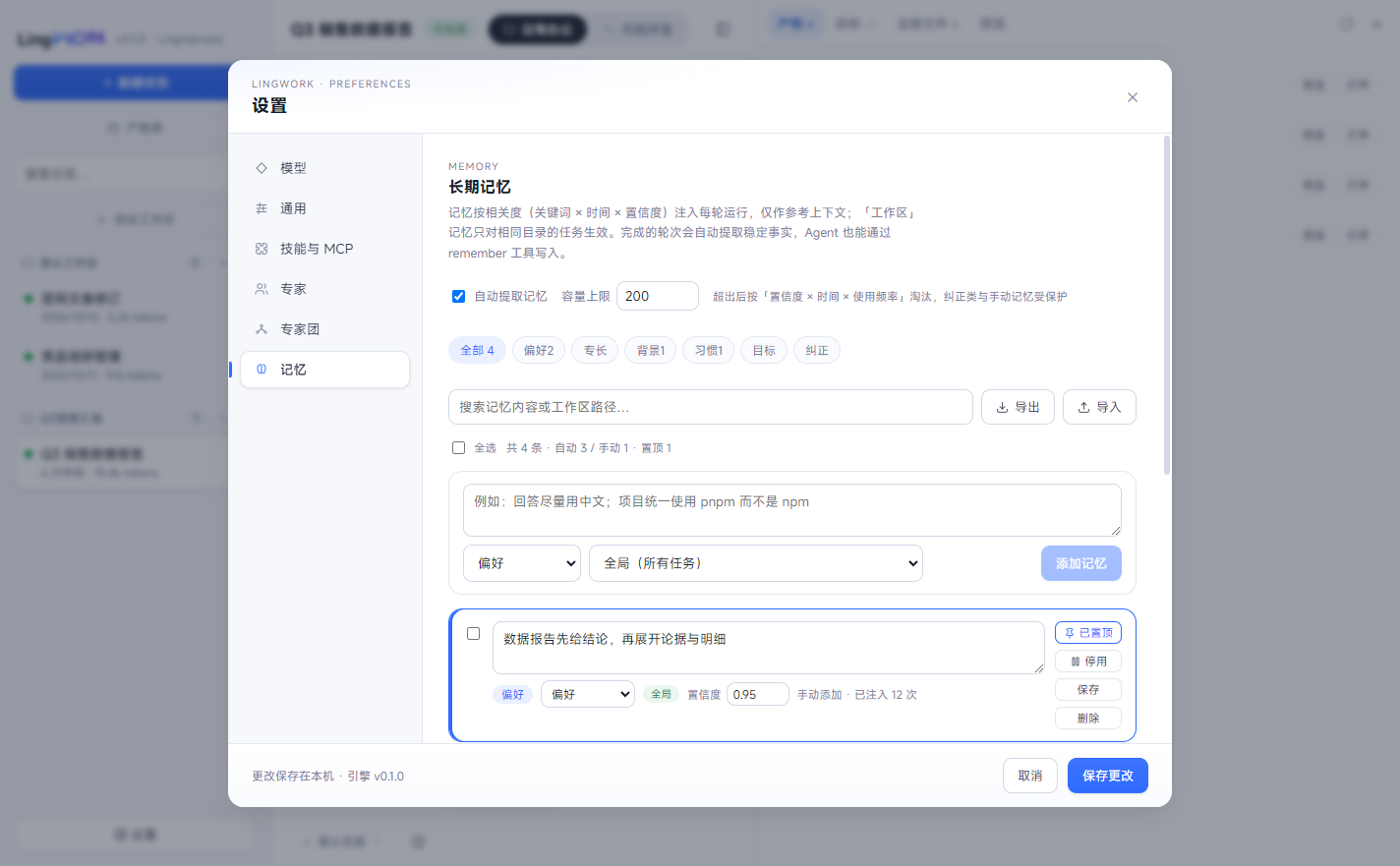
It remembers your preferences, expertise, and corrections across tasks. Pin, disable, adjust confidence, or export the memory.

03

Output inspection & repair

Only the final deliverables are inspected: Office, JSON, CSV, Markdown, HTML, and images get deterministic checks, with one-click or automatic repair.

04

Rich preview & inline editing

The results panel renders PDF, Word, Excel, PPT, and live HTML. When the agent writes to disk, the preview updates; text outputs can be edited in place.

05

Skills & MCP ecosystem

Standard SKILL.md skills are disclosed progressively; MCP tools over stdio or Streamable HTTP join the same tool surface and connect to your systems.

06

Multi-model & failover

Works with any OpenAI-compatible provider, with one-click model discovery. If the primary model fails, the fallback takes over; switch models per task at any time.

LingWork settings · memory manager: entries by category, with confidence, pinning, and import/export.
Settings · memory manager: category filters, pinning, confidence, and import/export

04 — Secure sandbox

Let it work — inside boundaries you set

By default, every file and command is confined to the task workspace. Anything outside it needs your approval.

Workspace sandbox

File operations are limited to the mounted task workspace; path escapes and symlink escapes are rejected. The engine only listens on 127.0.0.1.

Risky commands gated

Commands such as rm, git push, and sudo require confirmation. Files outside the workspace need approval — once, for this task, or not at all.

Choose the execution backend

Run commands locally or in a hardened container with resource limits, a read-only root filesystem, and policy-controlled network access. If it is unavailable, it fails instead of degrading silently.

Fully auditable

Every tool call — allowed, approved, or denied — is written to the audit log. Tasks, messages, and snapshots leave a trail you can review.

05 — Built on our own engine

Under the workspace: our own LingHarness

Every LingWork task runs on LingHarness: the ReAct loop, middleware chain, context budget, and multi-model failover. The desktop app is driven by a local Go sidecar over a random port with token authentication, and task data stays on your machine.

  • Our own engine, no black-box framework, fully auditable.
  • Local sidecar execution; data never leaves your computer.
  • Any OpenAI-compatible model plugs in.
// Expert team: collaboration as configuration
{
  "team": "Content studio",
  "members": [
    { "expert": "Copywriter", "role": "Draft" },
    { "expert": "Researcher",   "role": "Fact-check" },
    { "expert": "Editor",     "role": "Read-only review" }
  ]
}

// Once the team is bound, the main agent becomes the lead:
// decompose → assign → synthesize → review → deliver

Up to 8 members. Read-only members lose all write and command tools.

06 — Use cases

Hand it these jobs

01

Reports & presentations

Turn data into an analysis report and a presentation deck, checked and ready to use. No more late nights before the weekly review.

02

Data cleanup & analysis

Excel cleanup, reconciliation, multi-sheet merges, and charts. Hand off the tedious work and reference the output whenever you need it.

03

Faster development

Write code, fix bugs, upgrade dependencies, and run tests. Changes have snapshots and diffs; experiment in the sandbox, then review before merging.

04

Team batch work

Expert teams divide the work, with parallel tasks that do not block each other. Give repetitive research, copy, and organization to the digital employee.

Still doing the repetitive work yourself?

Book a demo and watch LingWork finish the job on your own computer.